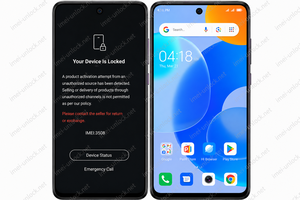
Tecno / Infinix / Itel MDM Removal Service (Permanent Unlock) (Super Fast Emergency 6 Hours)
Information
Service description
Tecno / Infinix / Itel MDM Removal Service (Permanent Unlock) (Super Fast Emergency 6 Hours)
Professional Super Fast Emergency MDM Removal Service for supported Tecno, Infinix and Itel smartphones. This premium online service permanently removes Enterprise MDM Lock using the device IMEI Number. No USB cable, flashing, rooting or remote access is required.
Tecno / Infinix / Itel MDM Remove Permanent Unlock (Super Fast Emergency 6 Hours)
Supported Brands: Tecno, Infinix & Itel
Supported Models: All Eligible Models
Service Type: Permanent MDM Removal by IMEI
Unlock Method: Official Server Processing
Required Information: IMEI Number + Lock Screen Photo Link
USB Cable: Not Required
Remote Access: Not Required
Estimated Processing Time: 6–12 Working Hours (Maximum)
Service Availability: Monday to Friday
Supported Devices
- Tecno Smartphones
- Infinix Smartphones
- Itel Smartphones
- Supported Enterprise MDM Locked Devices
- Eligible IMEI-Based Models
Super Fast Emergency Service
- Priority Supplier Processing
- Permanent Official Unlock
- IMEI Online Service
- No USB Cable Required
- No Flashing Required
- No Root Required
- No Remote Connection Required
- Factory Reset Supported After Unlock
- OTA Software Updates Supported
- Premium Emergency Processing Queue
Required Before Ordering
- Enter the correct IMEI Number.
- Upload a clear Lock Screen photo.
- Paste the image URL during checkout.
- Verify that all submitted information is correct.
You can upload your Lock Screen photo using:
How To Order
- Select this service.
- Enter your device IMEI Number.
- Paste the Lock Screen photo URL.
- Complete your payment.
- Your order will immediately enter the Emergency Priority Queue.
- You will receive an email notification after completion.
After Unlock
Once your device has been successfully processed, the Enterprise MDM restriction will be permanently removed. Your device will operate like an official device, allowing factory reset, software updates and normal daily use.
Not Supported
- Incorrect IMEI Numbers
- Invalid Lock Screen Photos
- Unsupported Models
- Security Changed Devices
- Security Damaged Devices
- Incorrect Submitted Information
Refund Policy
- No refund for incorrect IMEI submitted by the customer.
- No refund for unsupported devices.
- No refund for Security Changed devices.
- No refund for Security Damaged devices.
- No refund after supplier processing has started.
Working Schedule
This Emergency Service is available only during working days (Monday to Friday). Most supported orders are completed within 6 to 12 working hours, depending on supplier workload and server availability.
Important Information
This is an official IMEI-based online service. No USB cable, software installation, rooting or remote session is required.
Please verify your IMEI Number and Lock Screen photo before placing your order. Incorrect information may delay processing or cause service rejection.
This Premium Emergency Service is prioritized over the standard service, but final processing time remains subject to supplier verification and business hours.